newppearance

Your New Look, Before You Decide. 결정하기 전에, 먼저 확인하세요.

newppearance is an AI photo app for iPhone and Android. Turn one photo of your pet into the star of a dressed-up scene, or try hairstyles, makeup and cosmetic procedures on your own photo — and compare before and after. newppearance는 iPhone과 Android용 AI 사진 앱이에요. 반려동물 사진 한 장으로 멋지게 차려입은 장면의 주인공을 만들고, 내 사진으로 헤어스타일·메이크업·성형 시술을 미리 보고 전후를 비교해 보세요.

Free to download · No sign-up needed · No ads · No subscriptions 무료 다운로드 · 가입 없이 시작 · 광고 없음 · 구독 없음

newppearance before-and-after comparison screen
newppearance home screen: Your face, reimagined
How newppearance works, step by step

What you can do이런 걸 할 수 있어요

One photo, many new looks 사진 한 장으로 만나는 새로운 모습

newppearance uses Google's Gemini AI to create images from a photo you choose. Everything happens in the app: pick a photo, choose what you want to see, and save or share the result. newppearance는 Google Gemini AI로 내가 고른 사진에서 새로운 이미지를 만들어요. 사진을 고르고, 보고 싶은 모습을 선택하고, 결과를 저장하거나 공유하는 모든 과정이 앱 안에서 이뤄져요.

Pet mode — your pet, the star of any scene펫 모드 — 우리 아이, 오늘은 주인공

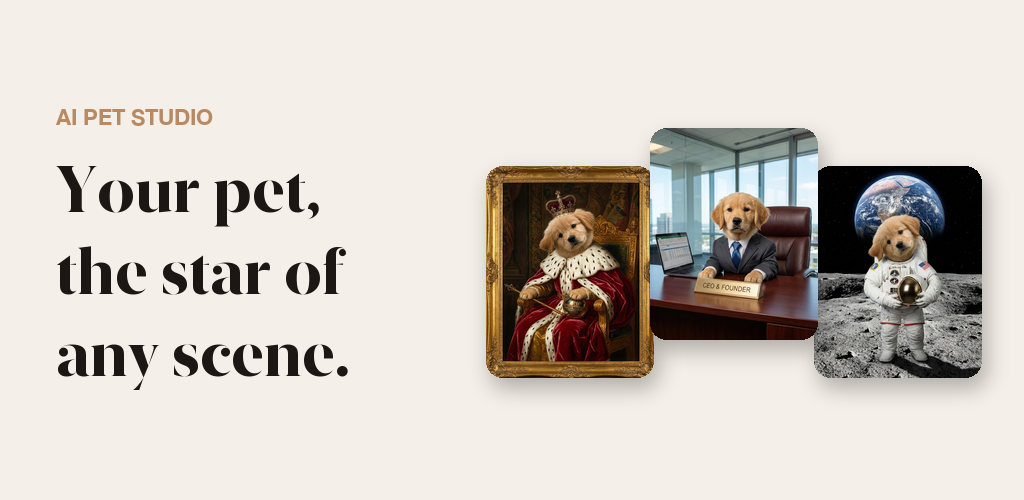
Add one photo of your dog, cat or any pet and pick a scene. Only the outfit and setting change — your pet still looks like your pet. Add a selfie if you want to step into the picture beside them.

Scenes include The CEO, Royal portrait, Astronaut, Action hero, Head chef and Family portrait, plus limited-time seasonal scenes. Each creation comes back as a sheet of six different takes; save or share the whole sheet or any single shot, and find past creations again in My pets.

강아지, 고양이 등 반려동물 사진 한 장을 올리고 장면을 고르세요. 바뀌는 건 의상과 배경뿐, 얼굴은 그대로 우리 아이예요. 셀카를 더하면 나도 바로 옆에서 함께 등장해요.

CEO, 왕실 초상화, 우주비행사, 액션 히어로, 수석 셰프, 가족사진 장면과 기간 한정 시즌 장면이 있어요. 한 번 만들 때마다 서로 다른 여섯 컷이 한 장에 담겨 나오고, 전체 또는 마음에 드는 한 컷만 저장·공유할 수 있어요. 만든 사진은 '내 반려동물'에서 언제든 다시 볼 수 있어요.

A golden retriever created with newppearance Pet mode as a royal portrait, a CEO and an astronaut on the Moon

Face studio — preview procedures페이스 스튜디오 — 시술 미리 보기

Choose a facial area — forehead, eyes, nose, lips, cheeks, jawline, ears, neck or full-face lifting — and a procedure, then see an AI-simulated result on your own photo.

Pick how strong the change should be (Subtle, Moderate or Dramatic), drag to compare before and after, and compare two saved results side by side in History.

이마, 눈, 코, 입술, 볼, 턱선, 귀, 목, 리프팅 중 부위와 시술을 고르면 내 사진에 AI 시뮬레이션 결과를 보여줘요.

변화의 정도를 은은하게·자연스럽게·과감하게 중에서 고르고, 드래그해서 전후를 비교하고, 기록에서 두 결과를 나란히 비교할 수 있어요.

Hair & Makeup studio — free every day헤어·메이크업 스튜디오 — 매일 무료

Try new hairstyles, hair colours and makeup looks on your own photo. Hair and makeup try-ons are free every day and don't use credits.

Want options? Ask for a six-look sheet and see six different styles on you at once.

내 사진으로 새로운 헤어스타일, 헤어 컬러, 메이크업을 체험해 보세요. 헤어·메이크업 체험은 매일 무료이고 크레딧을 쓰지 않아요.

여러 스타일을 한 번에 보고 싶다면, 여섯 가지 스타일을 한 장에 모아 보여주는 시트를 만들어 보세요.

Face harmony reading얼굴 하모니

After you crop your photo, you can get a short reading of your facial proportions — thirds, fifths and symmetry notes. A short preview is free; the full reading costs one credit. It is a playful aesthetic reading, not a medical assessment and not an attractiveness score.

사진을 자른 뒤 얼굴 비율(삼등분, 오등분, 대칭)에 대한 짧은 읽기를 받아볼 수 있어요. 짧은 미리보기는 무료이고, 전체 분석은 크레딧 1개로 열 수 있어요. 재미로 보는 미적 읽기일 뿐, 의료적 평가나 외모 점수가 아니에요.

How it works이용 방법

From photo to result in four steps 네 단계면 충분해요

  1. Add a photo사진 추가

    Take a photo in the app or pick one from your library. A clear, front-facing photo in even light works best.앱에서 바로 찍거나 앨범에서 골라요. 밝은 곳에서 정면으로 찍은 선명한 사진일수록 결과가 좋아요.

  2. Choose a look원하는 모습 선택

    Pick a pet scene, or a facial area and procedure, hairstyle or makeup look.펫 장면을 고르거나, 얼굴 부위와 시술, 헤어스타일, 메이크업을 골라요.

  3. Let the AI workAI가 만들기

    Your image is usually ready in about a minute. You can leave the app and get a notification when it's done.보통 1분 안팎이면 완성돼요. 앱을 닫아 두어도 완성되면 알림으로 알려드려요.

  4. Save & share저장 · 공유

    Compare before and after, save the result to your photos or share it in one tap.전후를 비교하고, 사진 앱에 저장하거나 탭 한 번으로 공유하세요.

Your photos내 사진은 안전하게

How your photos are handled 사진은 이렇게 다뤄져요

Face photos are sensitive. Before a face photo or selfie is used, the app asks for your consent and explains what happens to it. 얼굴 사진은 민감한 정보예요. 얼굴 사진이나 셀카를 사용하기 전에 앱이 먼저 동의를 구하고, 사진이 어떻게 처리되는지 알려드려요.

Not a medical device. Results are AI-generated images for fun and visual exploration. Face simulations are not medical advice and do not predict the outcome of a real procedure. Always talk to a licensed medical professional before deciding on any cosmetic procedure. Read the Privacy Policy for full details. 의료기기가 아닙니다. 결과는 재미와 탐색을 위한 AI 생성 이미지이며, 얼굴 시뮬레이션은 의료 조언이 아니고 실제 시술 결과를 예측하지 않아요. 시술을 결정하기 전에는 반드시 전문 의료인과 상담하세요. 자세한 내용은 개인정보처리방침(영문)을 확인하세요.

FAQ

Frequently asked questions 자주 묻는 질문

Is newppearance free?

The app is free to download, and every new install starts with 2 free credits. Hair and makeup try-ons are free every day and don't use credits. Pet scenes and procedure simulations use one credit each; if you want more, you can buy a one-time credit pack in the app. There are no subscriptions, purchased credits never expire, and the app has no ads.

Do I need to create an account?

No. You can start right away without signing up. If you want to keep your account across devices, you can sign in with Apple or Google later, and your credits and history stay with you.

What happens to my photos?

Your photo is sent over TLS to our server and to Google's Gemini AI only to create your image. Input photos are deleted from our servers within 1 hour, finished images are saved on your device, and your photos are never used for advertising or AI training. See the Privacy Policy for details.

Will a real procedure look like the simulation?

Not necessarily. Face simulations are AI-generated images for visual exploration, not a medical prediction. newppearance is not a medical device and does not give medical advice — talk to a licensed medical professional before deciding on any procedure.

Which pets work in Pet mode?

Dogs, cats and other pets. A photo with a clear view of your pet's face works best. Adding your own selfie is optional.

How long does it take?

Most images are ready in about a minute. You can close the app while it works — turn on notifications and we'll let you know when your result is ready.

Which devices and languages are supported?

newppearance is available for iPhone and iPad on the App Store and for Android on Google Play. The app is available in English, Korean and Japanese.

newppearance는 무료인가요?

앱은 무료로 다운로드할 수 있고, 새로 설치하면 무료 크레딧 2개가 제공돼요. 헤어·메이크업 체험은 매일 무료이며 크레딧을 쓰지 않아요. 펫 장면과 시술 시뮬레이션은 한 번에 크레딧 1개를 쓰고, 더 필요하면 앱에서 일회성 크레딧 팩을 구매할 수 있어요. 구독은 없고, 구매한 크레딧은 만료되지 않으며, 광고도 없어요.

회원가입이 필요한가요?

아니요. 가입 없이 바로 시작할 수 있어요. 여러 기기에서 계속 쓰고 싶다면 나중에 Apple 또는 Google로 로그인하면 되고, 크레딧과 기록은 그대로 유지돼요.

내 사진은 어떻게 처리되나요?

사진은 이미지를 만드는 용도로만 TLS를 통해 서버와 Google Gemini AI로 전송돼요. 입력 사진은 1시간 이내에 서버에서 삭제되고, 완성된 이미지는 내 기기에 저장되며, 광고나 AI 학습에는 절대 사용되지 않아요. 자세한 내용은 개인정보처리방침(영문)을 확인하세요.

실제 시술 결과도 시뮬레이션과 같나요?

꼭 그렇지는 않아요. 얼굴 시뮬레이션은 시각적 탐색을 위한 AI 생성 이미지일 뿐 의학적 예측이 아니에요. newppearance는 의료기기가 아니며 의료 조언을 제공하지 않아요. 시술을 결정하기 전에는 전문 의료인과 상담하세요.

펫 모드에는 어떤 반려동물을 쓸 수 있나요?

강아지, 고양이 등 반려동물이라면 모두 좋아요. 얼굴이 잘 보이는 사진일수록 잘 나와요. 내 셀카를 더하는 건 선택이에요.

얼마나 걸리나요?

대부분 1분 안팎이면 완성돼요. 기다리는 동안 앱을 닫아도 되고, 알림을 켜 두면 완성되었을 때 알려드려요.

어떤 기기와 언어를 지원하나요?

App Store에서 iPhone·iPad용으로, Google Play에서 Android용으로 받을 수 있어요. 앱은 한국어, 영어, 일본어를 지원해요.

Try newppearance today 지금 newppearance를 시작해 보세요

Free to download on the App Store and Google Play. App Store와 Google Play에서 무료로 받을 수 있어요.